Privacy Statement

Metrobus is committed to the privacy and security of your electronic commerce. For your full understanding, the following statement details
our information gathering and dissemination practices, as well as our security measures.
What information do we collect?
We collect information from you when you register on our sites, place an order, subscribe to our newsletter, respond to a survey or fill out a form.
When ordering or registering on our site, as appropriate, you may be asked to enter your: name, e-mail address, mailing address, phone number
or credit card information. You may, however, visit our site anonymously.
For what reasons do we use your information?
Any of the information we collect from you may be used in one of the following ways:
- To personalize your experience
(your information helps us to better respond to your individual needs)
- To improve our website
(we continually strive to improve our website offerings based on the information and feedback we receive from you)
- To improve customer service
(your information helps us to more effectively respond to your customer service requests and support needs)
- To process transactions
- To administer a contest, promotion, survey or other site feature
- To send periodic emails
The email address you provide for order processing, may be used to send you information and updates pertaining to your order, in addition to receiving occasional company news, updates, related product or service information, etc.
Our email practices are conducted in accordance with Canadian
Anti-Spam Legislation, and any and all email correspondence
received from us will contain easily identifiable unsubscribe
links.
How do we protect your information?
We implement a variety of security measures to maintain the safety of your personal information when you place an order or access your personal information.
We offer the use of a secure server. All supplied sensitive/credit information is encrypted and transmitted via the Transport Layer Security Protocol (TLS) to our, or in the case of a financial transaction, to our payment gateway provider's database, only to be accessible by those authorized with special access rights to such systems, and who are required to keep the information confidential. TLS is a protocol that ensures privacy between communicating applications and their users on the Internet. When a server and client communicate, TLS ensures that no third party may eavesdrop or tamper with any message. TLS is the successor to the Secure Sockets Layer (SSL).
Upon completion of financial transactions, Metrobus does not store credit card numbers.
Do we use cookies?
Yes (cookies are small files that a site or its service provider transfers to your computers hard drive through your Web browser (if you allow) that enables the sites or service providers systems to recognize your browser and capture and remember certain information.
We use cookies to help us remember and process the items in your shopping cart, understand and save your preferences for future visits, keep track of advertisements and compile aggregate data about site traffic and site interaction so that we can offer better site experiences and tools in the future. We may contract with third-party service providers to assist us in better understanding our site visitors. These service providers are not permitted to use the information collected on our behalf except to help us conduct and improve our business.
If you prefer, you can choose to have your computer warn you each
time a cookie is being sent, or you can choose to turn off all
cookies via your browser settings. Like most websites, if you turn
your cookies off, some of our services may not function properly.
However, you can still place orders over the telephone by contacting
our Customer Service Centre at 722-9400.
Do we disclose any information to outside parties?
We do not sell, trade, or otherwise transfer to outside parties your personally identifiable information. This does not include trusted third parties who assist us in operating our website, conducting our business, or servicing you, so long as those parties agree to keep this information confidential. We may also release your information when we believe release is appropriate to comply with the law, enforce our site policies, or protect ours or others rights, property, or safety. However, non-personally identifiable visitor information may be provided to other parties for marketing, advertising, or other uses.
Third party links
Occasionally, at our discretion, we may include or offer third party products or services on our website. These third party sites have separate and independent privacy policies. We therefore have no responsibility or liability for the content and activities of these linked sites. Nonetheless, we seek to protect the integrity of our site and welcome any feedback about these sites.
Your Consent
By using our site, you consent to our Privacy Policy.
Changes to our Privacy Policy
If we decide to change our privacy policy, we will post those changes on this page.
Contacting Us
If there are any questions regarding this privacy policy you may contact us using the information below.
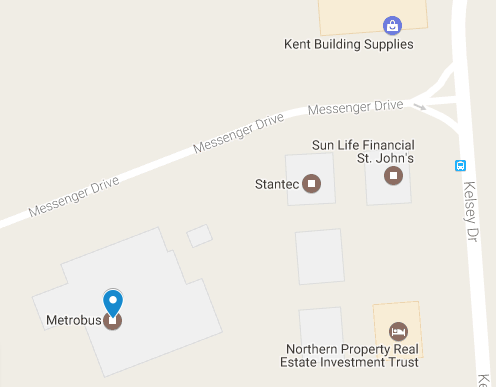
St. John's Transportation Commission
25 Messenger Drive
St. John's NL A1B 0H6
Canada
Online contact information can be found at https://www.metrobus.com
Privacy Policy prepared by St. John's Transportation Commisssion, updated 03/7/2016